
All 42 MCP tools
Everything an AI agent can do with a VxMouse device, grouped.
Only basic mouse mode is in the current release. That means the accessibility service, double-press OK to toggle, and pointer movement, click, drag and scroll. Hotkeys, the ADB assist mode, Web Input, live translation and the whole MCP server are finished but arrive with the next VxMouse update. Pages and sections marked Next release describe those.
42 tools: get_skill plus 41 device tools whose names start with vx_. Names below are exact.
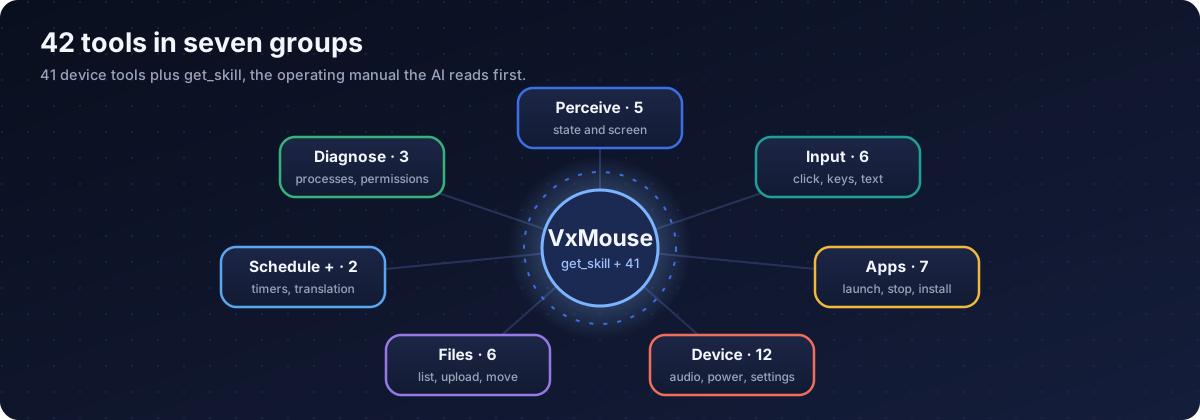
Perceive: state and screen 5 tools
How the AI sees the device.
| Tool | What it does |
|---|---|
vx_system_status | Current device and foreground app status, with an optional smart screenshot. Used at the start and whenever the state is unclear. |
vx_display_resolution | Screen width, height, density and orientation, needed to turn screenshot positions into click positions. |
vx_display_screenshot | A colour screenshot at full or half size. A black image can mean protected video or a loading screen. |
vx_accessibility_snapshot | The on-screen element tree with bounds, click points and which element has focus. |
vx_accessibility_find | Find elements by text or description, best matches first. |
Input: click, keys, text 6 tools
How the AI acts on what it sees.
| Tool | What it does |
|---|---|
vx_accessibility_click | Click or long-click an element by id, text or description, or the focused element. Falls back to a centre tap when an app blocks the action. |
vx_keyboard_keypress | Send remote keys such as directional pad, OK, Back, Home, Menu and media keys, optionally repeated. |
vx_keyboard_sequence | Send several keys in one call for multi-step navigation. |
vx_keyboard_type | Type text by clipboard paste, including other languages and Unicode. |
vx_clipboard | Copy, read or clear the clipboard. |
vx_display_toast | Show a short message on the TV, 1 to 10 seconds, on top of any app. |
Apps 7 tools
Find, open, close and manage apps.
| Tool | What it does |
|---|---|
vx_apps_list | All installed apps with their exact package names. |
vx_apps_launch | Launch an app, optionally as a fresh start. |
vx_app_stop | Close an app, with a stronger fallback if a normal stop fails. |
vx_app_bring_to_front | Bring a running app forward without restarting it. |
vx_apps_current | Which app and screen is in front right now. |
vx_apps_install | Install an APK that is already on the device. |
vx_apps_uninstall | Remove an app. Marked dangerous; a toast appears first. |
System and device 12 tools
Intents, sound, power, display and settings.
| Tool | What it does |
|---|---|
vx_adb_execute | Run a shell command through the optional ADB channel. Dangerous commands are blocked unless you allow them. |
vx_intent_view | Open a link, file or deep link, for example a video search page. |
vx_intent_search | Run a global search with plain text. |
vx_system_audio_control | Volume up, volume down or mute through HDMI CEC. |
vx_display_brightness | Read or set brightness, or switch auto brightness. |
vx_system_power_sleep | Turn the screen off without powering the device down. |
vx_system_power_is_screen_on | Is the screen on or off. |
vx_system_battery_status | Battery level, charging, health, temperature. Useful on phones and tablets. |
vx_system_power_info | Battery, screen state and charging estimates in one answer. |
vx_system_rotation | Read or set screen rotation to 0, 90, 180 or 270 degrees. |
vx_cec_info | HDMI CEC status, device name and HDMI port. |
vx_system_settings | Read, write or list Android settings. |
Files 6 tools
Work with storage on the device.
| Tool | What it does |
|---|---|
vx_fs_list_dir | List a folder with names, sizes and types. |
vx_fs_list_volume | List internal storage, USB drives and SD cards with capacity. |
vx_fs_upload | Send a file to the device. |
vx_fs_download | Fetch a file from the device. |
vx_fs_move | Move or rename a file or folder. |
vx_fs_delete | Delete a file or folder. Permanent; a toast appears first. |
Schedule and translation 2 tools
Work that continues after the chat ends.
| Tool | What it does |
|---|---|
vx_schedule | Add, list, remove, pause and resume timed tasks (one time or repeating). |
vx_translation | Start, stop and check the full-screen live translation overlay. |
Diagnostics 3 tools
Understand what is running and what apps can do.
| Tool | What it does |
|---|---|
vx_process_list | Running processes with memory use. |
vx_app_permissions_get | Permissions an app declares and which are granted. |
vx_system_apps_by_permission | Which apps ask for a given permission, for example camera or microphone. |
The operating manual 1 tool
| Tool | What it does |
|---|---|
get_skill | The operating manual. The server tells the AI to read it first. It covers key codes, forbidden keys, apps with limited accessibility, search strategy and safety. |
Notes that matter in practice
- Package names for
vx_apps_launchmust come fromvx_apps_list. - Full-size and half-size screenshots exist. Positions measured on a half-size screenshot must be doubled.
- Dangerous tools (uninstall, delete) show a toast on the TV before they act.
- The accessibility tools do not see inside YouTube TV, Netflix, Spotify, Apple TV or Prime Video. Use screenshots and keys there.
- The shell tool and Web Input need the ADB channel; the other tools do not.
Get VxMouse
VxMouse is distributed to supporters on Patreon and can be installed with GTV-toolkit on Windows.