
MCP security
What to switch on, what stays blocked, and what never to expose.
Only basic mouse mode is in the current release. That means the accessibility service, double-press OK to toggle, and pointer movement, click, drag and scroll. Hotkeys, the ADB assist mode, Web Input, live translation and the whole MCP server are finished but arrive with the next VxMouse update. Pages and sections marked Next release describe those.
An MCP connection gives an AI real control of the device, so treat it like a key. This page lists the risks and the settings that reduce them.
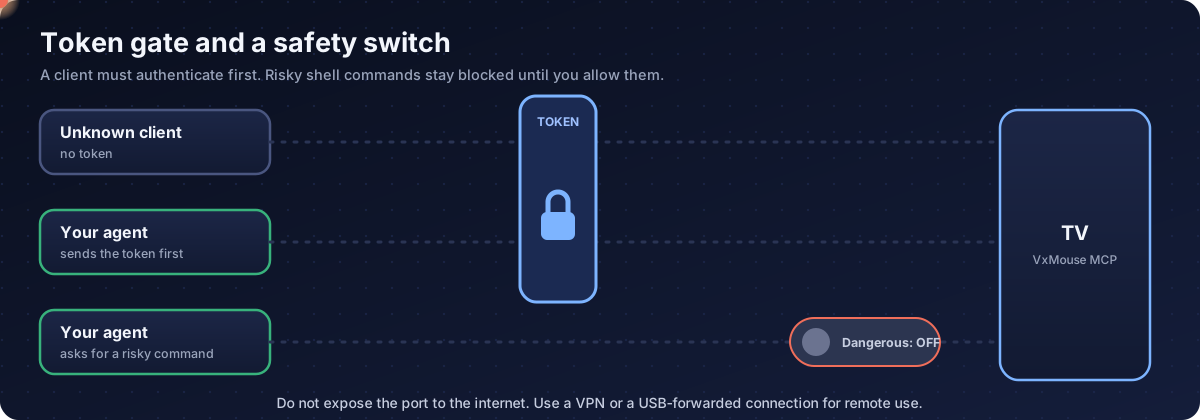
Risks and answers
| Risk | Detail | Answer |
|---|---|---|
| Anyone on the network can connect | The server listens on the local network, with no accounts, only an optional token. | Set a token. Keep the TV off the public internet. |
| The AI makes a mistake | Deleting files, uninstalling, powering off. | Dangerous shell commands are blocked by default, and the manual tells the AI to confirm. |
| Screens leak | Screenshots and the element tree go to the client. | Connect only clients you trust. |
| Files leak | The file tools can read user files. | Use a token; switch the server off after use. |
| A schedule lingers | Scheduled tasks run later. | Check with the list action now and then. |
The best defence is the simplest: switch the MCP server off when you are not using it.
Token
- Set it in the MCP section of the app.
- The client authenticates before anything else; wrong tokens are refused.
- With no token, anyone who can reach the port can operate the TV.
Dangerous shell commands
The shell tool blocks high-risk commands by default. The app has an Allow dangerous ADB commands switch. When it is on, the app shows a yellow warning. Turn it on only while debugging.
Permissions the app uses
| Permission | Used for |
|---|---|
| Accessibility service | Mouse mode, element tree, clicks. You turn it on in system settings. |
| Secure settings write | The settings tool writing secure settings. A one-time setup from a computer. |
| All files access | File tools. You allow it in system settings. |
| See all installed apps | Listing apps. |
| Install and delete packages | Installing and uninstalling through the tools. |
| Foreground service | Keeping schedules running in the background. |
Some of these are system-level and suit sideloaded builds better than store builds. That is one reason VxMouse is distributed to supporters.
Network exposure
| Setup | Risk |
|---|---|
| Home Wi-Fi only | Low. Other devices on the same network can still reach it. |
| TV on a guest network | Medium. Guests can scan the port. |
| Router forwards the port to the internet | High. The TV is open to the world. |
| Through a VPN | Low. Recommended for remote use. |
Do not expose the port to the internet. For remote use, use a VPN or a forwarded USB connection.
The AI's own rules
The operating manual forbids the power key and the voice assistant key, payments, adding or removing accounts, and dropping Wi-Fi, and asks for confirmation before risky steps. These are advice to the AI and are not enforced by the server. The protection that counts is the token and the server switch.
Get VxMouse
VxMouse is distributed to supporters on Patreon and can be installed with GTV-toolkit on Windows.