AI agent control with MCP
A built-in MCP server lets Claude or any MCP client operate an Android TV, Google TV, phone or tablet.
Only basic mouse mode is in the current release. That means the accessibility service, double-press OK to toggle, and pointer movement, click, drag and scroll. Hotkeys, the ADB assist mode, Web Input, live translation and the whole MCP server are finished but arrive with the next VxMouse update. Pages and sections marked Next release describe those.
The Model Context Protocol (MCP) is an open standard that lets AI apps call tools. VxMouse runs an MCP server on the TV itself. Once an AI client connects, it can operate the device much like a person with a remote, and better in some ways, because it can also read the screen.
Server facts
| Item | Value |
|---|---|
| Name and version | vxmouse-mcp-server 1.0.2 (build 2) |
| MCP protocol version | 2024-11-05 |
| Transport | WebSocket, JSON-RPC 2.0. No HTTP REST endpoint. |
| Address | ws://<tv-ip>:8787 (port 8787 by default, changeable in the app) |
| Capabilities | Tools (list and call) |
| Authentication | Optional token. The client sends it first. |
| Runs in | The VxMouse app process. If Android ends the app, the connection drops and the bridge reconnects. |
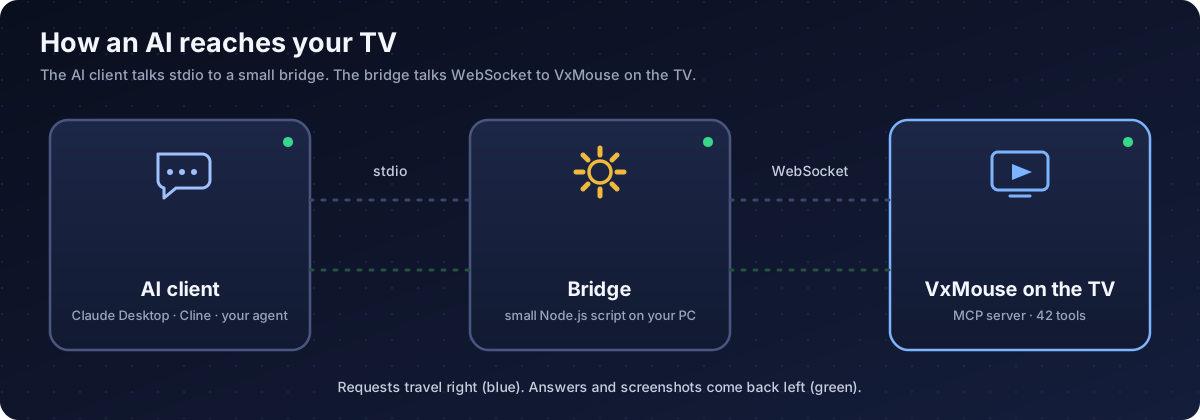
Most MCP clients only speak stdio, so a small bridge script (Node.js 18 or newer) converts stdio to the WebSocket the TV serves. See setup.
The connection in four steps
- The client sends
initializewith its name and the protocol version. - The TV answers with server details and a device card: model, Android version, screen resolution, device type and installed apps.
- The client sends
notifications/initialized. - If a token is set, the client sends
authwith the token. Then it can list and call tools.
The server's instructions tell the AI to read get_skill immediately. That tool returns the full operating manual.
Why this MCP is different
| A typical remote API | VxMouse MCP |
|---|---|
| Sends keys only | Keys plus accessibility clicks that hit the element directly, with no blind arrow-key hunting |
| No view of the screen | Screenshots (full or half size) and the element tree with focus state |
| No idea where it is | The device card at start: model, resolution, installed apps |
| Real time only | Schedules with one-time and repeating tasks, running with the chat closed |
| Plain text | Live full-screen translation overlay |
| TV only | The same tools also work on Android phones and tablets through ADB touch coordinates |
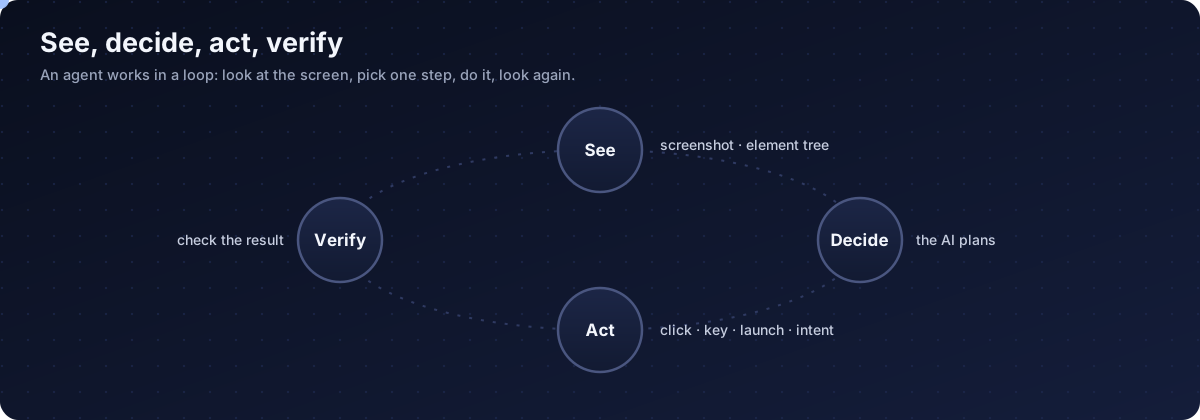
In short, the AI gets eyes (screenshots), coordinates (the element tree), hands (clicks, keys, shell) and memory (schedules).
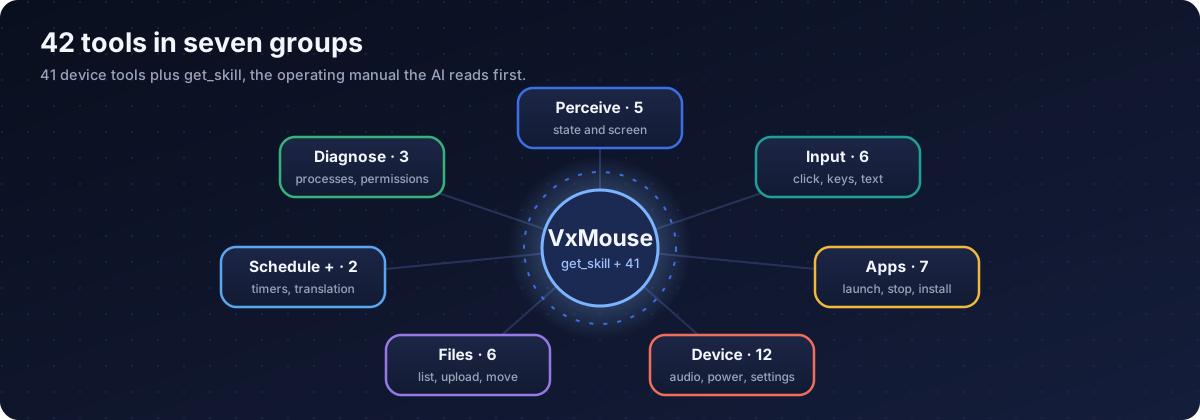
42 tools
One manual tool plus 41 device tools, in seven groups. Read the full list.
Hidden tools
Ten more tools are implemented but deliberately left out of the tool list, to avoid diluting the AI's attention: a direct mouse click, a grayscale screenshot, two app-stop variants, an intent sender, a dialer, system-app enable and disable, and two launcher get and set tools. Calls to them still work if a client asks for them by name.
Limits to know
- One request sequence at a time per connection. Long actions such as launching an app can make the next request wait a moment.
- One AI client per session in practice.
- Screenshots of protected video (Netflix and similar) are black. That is an Android restriction.
- The shell tool needs the ADB channel. Without ADB the agent uses the accessibility tools.
Frequently asked questions
What is MCP?
Model Context Protocol is an open standard that lets AI apps use tools. VxMouse runs an MCP server on the TV so an AI client can see the screen and press buttons.
Is the MCP server available now?
It is finished but not in the current release. It arrives with the next VxMouse update.
Which AI clients can connect?
Any MCP-capable client: Claude Desktop, Cline and other agents. Most clients speak stdio, so a small bridge script converts that to the WebSocket connection the TV uses. You can also write your own WebSocket client.
How many tools does the MCP server offer?
42: one operating-manual tool plus 41 device tools for sensing, input, apps, system, files, scheduling, translation and diagnostics.
Can an AI control any app?
Most. YouTube TV, Netflix, Spotify, Apple TV and Prime Video hide their on-screen structure, so the agent uses screenshots and remote keys there. Protected video shows as a black screenshot.
Is it safe to let an AI control my TV?
Set a token, keep the TV off the public internet, and switch the server off when you do not need it. Dangerous shell commands are blocked by default. The AI's own safety rules are advice, not enforcement.
Does the AI see my screen?
Yes. Screenshots and the on-screen element tree are handed to the connected AI client, so connect only clients you trust.
How do I get VxMouse?
VxMouse is distributed to supporters on Patreon and can be installed with GTV-toolkit on Windows.
Get VxMouse
VxMouse is distributed to supporters on Patreon and can be installed with GTV-toolkit on Windows.